On this page
Content reviewed for v0.179.0. See changes since your version.
Open Today
Click Today in the sidebar or press 0. To start there every time, choose Today under Settings → Appearance → Start With. Otherwise the app remembers the view you last used.
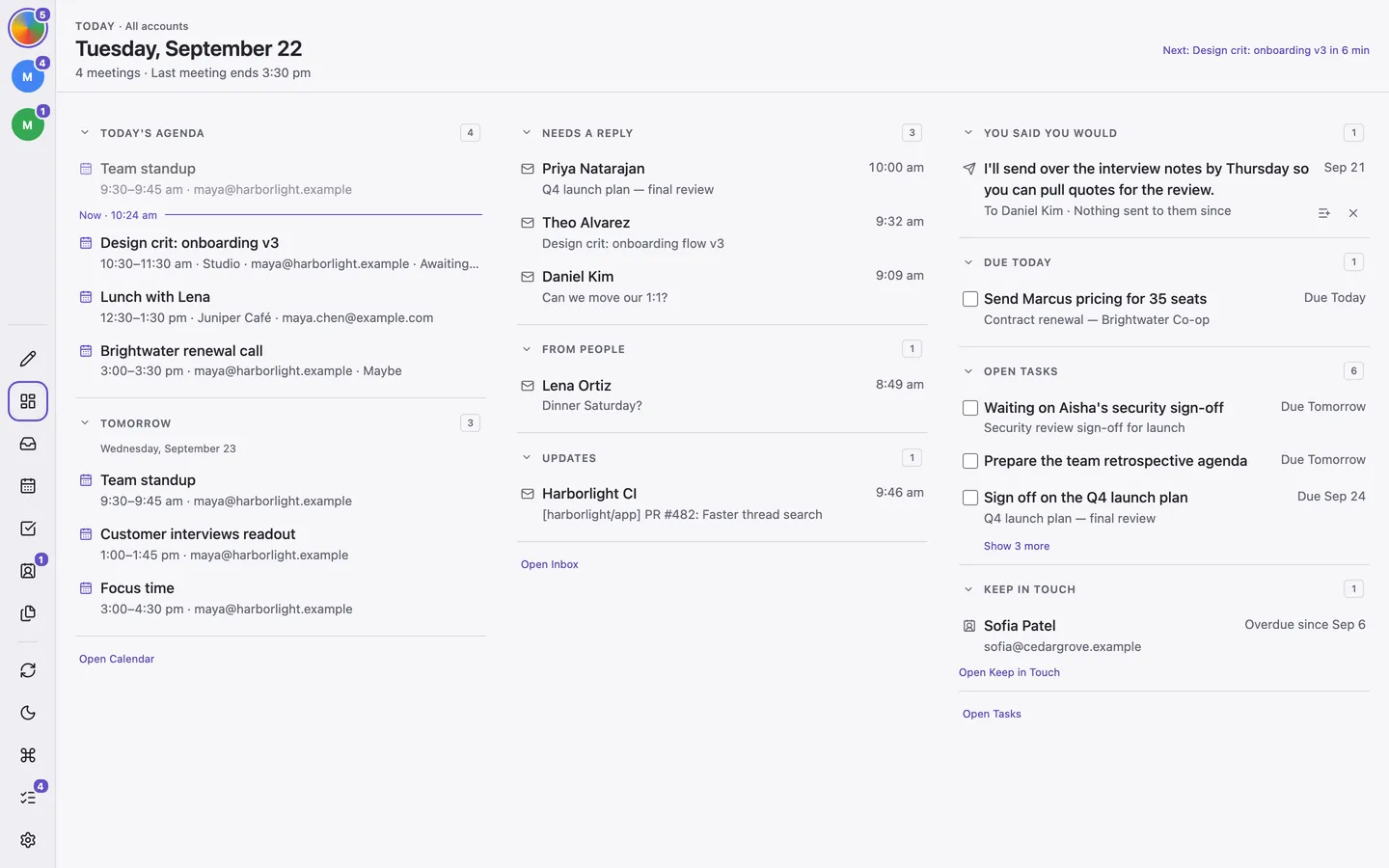
Read Your Agenda
A line under the date summarizes your remaining meetings, free time, conflicts, and when your last meeting ends. The agenda needs a Google Calendar connection.
- Finished and declined events are dimmed; Now separates what is still ahead.
- Tomorrow shows the first few events the next day.
- Join opens your next online meeting.
- Overlapping meetings are marked. Recorded means the invitation says a session will be recorded; it does not guarantee a recording will be available.
Work Through Mail and Tasks
Unread mail is grouped into Invitations, Needs a reply, From people, and Updates. Needs a reply highlights messages written to you and at most two others by people you write to. Updates includes newsletters, notifications, and no-reply senders. A message can also say that its sender is in one of your meetings today.
Tasks overdue or due today come first, followed by other open tasks and people due for a Keep in Touch check-in. Click a person to open their profile. Open Inbox, Open Calendar, and Open Tasks lead to the full workspaces.
Mail and tasks follow the selected mail account. The agenda includes every calendar you show in Calendar, regardless of that mail account. If the agenda looks wrong, check calendar selection.
You Said You Would
You said you would finds promises in your own sent mail from the last two weeks, such as “I'll send the report over,” when you have not written to that person since. Click one to open its conversation, turn it into a task, or dismiss it. Detection runs on your computer without AI. Review the suggestion; it may not know you already finished the work elsewhere.